Public beta is open: how Nestarc Webhooks delivers NestJS events
A practical walkthrough of how Nestarc Webhooks receives a NestJS event, matches endpoints, signs requests, retries failures, and exposes delivery logs.
Nestarc Webhooks is now in public beta. The free tier - 5,000 messages per month, 7-day delivery log retention - is available to any Google or GitHub account today.
The goal of this beta is simple: make the whole webhook delivery loop visible before you commit to it. A NestJS service can publish one event, and Nestarc Webhooks handles endpoint matching, signed HTTP delivery, retries, and searchable logs.
That means teams can ship customer-facing webhooks without first building their own queue workers, retry scheduler, HMAC signing code, endpoint state, and delivery log views.
Paid plans (Starter, Pro) will activate with billing once we exit public beta. Until then, teams that need higher limits or commercial onboarding can reach out at [email protected] (opens in new tab).
What the service does
Your application sends a message to Nestarc Webhooks. A message is an event name plus a JSON payload, such as order.created with the order data your customer needs.
From there, Nestarc Webhooks takes over the outbound delivery work:
- Store the message so it can be inspected later.
- Find active endpoints in your application that subscribe to the event name.
- Create a delivery record for each matching endpoint.
- Sign each outbound payload with the endpoint's HMAC-SHA256 secret.
- Send the request and record the response status, latency, attempt count, and error body.
- Retry failed deliveries with backoff until the delivery succeeds or reaches its retry limit.
- Let you inspect messages, deliveries, and attempts from the dashboard.
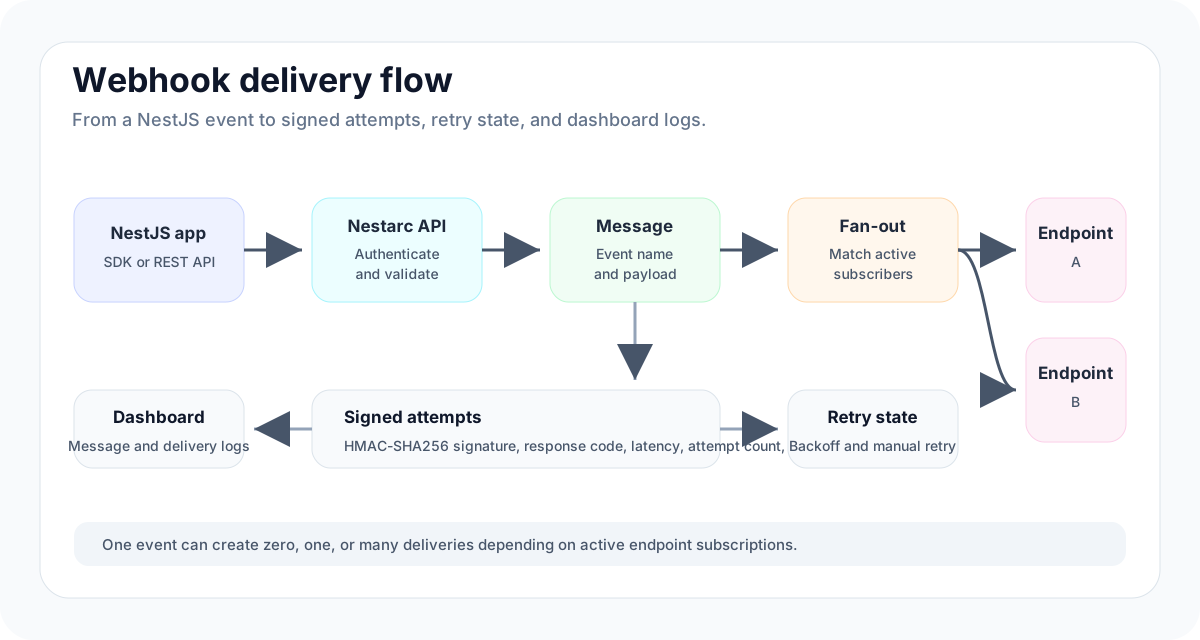
How a webhook moves through the system
1. Emit from your NestJS app
You can publish a message through the REST API, the WebhookClientService, or the @WebhookEmit decorator from @nestarc/webhook-client.
The SDK keeps application code small. Your service sends an event name and payload; the platform receives the message through the same /api/v1/messages API that the dashboard and cURL examples use.
@Injectable()
export class OrdersService {
  constructor(private readonly webhooks: WebhookClientService) {}

  async publishOrderCreated(order: Order) {
    await this.webhooks.send({
      eventType: "order.created",
      payload: {
        id: order.id,
        total: order.total,
        currency: order.currency,
      },
      idempotencyKey: `order.created:${order.id}`,
    });
  }
}
If you provide an idempotency key, repeated sends for the same operation can be handled safely. If you omit one in SDK v0.2 and later, the client creates an Idempotency-Key header automatically for each send.
2. Match the right endpoints
Each application can register multiple endpoints. An endpoint has a destination URL, a signing secret, active state, and an event subscription list.
When a message arrives, Nestarc Webhooks checks the event name against those subscriptions. An endpoint can subscribe to specific event names or use * to receive everything for the application.
This is the fan-out step: one message can become one delivery, many deliveries, or no deliveries if no active endpoint matches.
3. Sign every outbound request
Every delivery is signed before it leaves the platform. The signature uses HMAC-SHA256 with the endpoint's signing secret, so your customer endpoint can verify that the payload came from Nestarc Webhooks and was not modified in transit.
The endpoint secret can also be rotated. During rotation, the platform can keep a previous secret temporarily so receivers have time to deploy the new verification secret.
4. Retry and track delivery state
Webhook receivers fail in ordinary ways: deploy windows, bad TLS configuration, overloaded services, 5xx responses, timeouts, or temporary network issues.
Nestarc Webhooks records each attempt and retries failed deliveries with backoff. The delivery keeps its status, attempt count, next attempt time, last error, response status, response body, and latency.
If an endpoint keeps failing, the platform tracks consecutive failures and can mark endpoint state accordingly. When the receiver is healthy again, failed deliveries can be retried manually from the dashboard.
5. Inspect what happened
The dashboard is built around the questions teams usually ask during integration:
- Did we publish the event?
- Which endpoints matched it?
- Which deliveries succeeded or failed?
- What did the receiver return?
- How many attempts were made?
- Can we retry the failed delivery now?
For the Free tier, delivery logs are retained for 7 days. Paid tiers will extend the retention window when billing opens.
What is in place from day one
Public beta starts with the operational pieces that make the service evaluable, not just usable:
- Public status page at status.nestarc.dev (opens in new tab).
- A written Reliability & Support Policy with response targets, incident communication, and the current single-operator posture.
- A written Security posture with active controls, the compliance roadmap, and a vulnerability-disclosure path.
- An open-source delivery engine and NestJS client path, so the core delivery model is inspectable.
The important boundary is also explicit: Nestarc Webhooks is in public beta. It is ready for teams to evaluate the delivery model, integrate the SDK, inspect logs, and test receiver behavior. Teams that need higher volume, migration help, or production onboarding should contact us before relying on beta defaults.
Start in the dashboard, keep the docs open, then register an endpoint, publish an event, and inspect the delivery from the message log.